Improve conversion and get more sales
Discount popups are effective for increasing sales by offering immediate savings with a promo code.
6.20%
avg. CTR
promo code + timer
6.20%
avg. CTR
promo code + timer
6.2%
avg. CTR
promo code popups
6.2%
avg. CTR
promo code popups
4.4%
avg. CTR
slider + promo code
4.4%
avg. CTR
slider + promo code
3.2%
avg. CTR
promo code on exit
3.2%
avg. CTR
promo code on exit
6.20%
avg. CTR
promo code + timer
4.4%
avg. CTR
slider + promo code
6.2%
avg. CTR
promo code popups
3.2%
avg. CTR
promo code on exit
Help high-intent visitors decide faster
Some visitors are almost there but still unsure. Showing a discount at that moment can help them move forward and place the order.
Convert the first purchase faster
For new visitors, a discount can lower the barrier. It gives them a simple reason to try your product instead of leaving and not coming back.
Grow your email list with an offer
You can also use the discount in exchange for an email. People are more likely to sign up when there’s something in return, and you get a list you can use later.
Key features
Key features

Incentive
Game component
Show the discount right away. People should not have to guess what they get — the value needs to be obvious in the first second.
Use game-like popups people instantly recognize — spin the wheel, scratch cards, memory matching, treasure hunts, slot machines, pick-a-gift, or seasonal ones.
Clear offer
Incentive offer
Add a short line that explains why the offer matters. It can be about saving money, trying something new, or getting access — just keep it clear and direct.
Offer clear rewards — discounts, free shipping, or exclusive perks — in exchange for email. Well-structured incentives motivate signups while allowing you to control margins.
Use promo code
Conversion-focused flow
Make it simple to use the offer. A clear button and a short flow help people act without thinking too much. The fewer steps, the better the result.
Guide users from interaction to signup with a simple flow: game, email capture, strong call-to-action, and optional countdown timers to create urgency.
Incentive
Show the discount right away. People should not have to guess what they get — the value needs to be obvious in the first second.
Clear offer
Add a short line that explains why the offer matters. It can be about saving money, trying something new, or getting access — just keep it clear and direct.
Use promo code
Make it simple to use the offer. A clear button and a short flow help people act without thinking too much. The fewer steps, the better the result.
When to use for better results
When to use for better results
Target new visitors
Convert first-time visitors
Use a discount popup on the first visit, especially on entry pages. For someone new, even a small coupon can make it easier to place the first order instead of leaving.
Turn first visits into signups or first purchases by offering an engaging reward upfront. This helps you capture attention early and build your list before users leave without taking action.
Exit intent
Recover exiting visitors
If someone is leaving the site, you can still show a discount. Some visitors will notice it and use it before they go. It doesn’t catch everyone, but it works often enough.
Stop visitors right before they leave with a timely offer or discount. Exit-intent gamified popups give users a reason to stay, helping you capture leads and recover lost conversions.
Recover cart
Drive seasonal campaigns
Discounts also work well near the cart or during seasonal campaigns. When people are already close to buying, or there’s a limited-time offer, a coupon can help them finish the order.
Highlight limited-time offers during peak periods with interactive experiences that stand out. Gamified popups help increase engagement and drive more immediate sales during high-traffic campaigns.
Target new visitors
Use a discount popup on the first visit, especially on entry pages. For someone new, even a small coupon can make it easier to place the first order instead of leaving.
Exit intent
If someone is leaving the site, you can still show a discount. Some visitors will notice it and use it before they go. It doesn’t catch everyone, but it works often enough.
Recover cart
Discounts also work well near the cart or during seasonal campaigns. When people are already close to buying, or there’s a limited-time offer, a coupon can help them finish the order.
Connects with any of your tools
Connects with any of your tools


and more than 20+ tools to integrate
Get inspired by CRO-ready templates
Get inspired by CRO-ready templates
How to create
How to create
Convert more with proven CRO tactics
Convert more with proven CRO tactics
Convert more with proven CRO tactics
See how much revenue your current popups are leaving on the table. Get started in minutes and see results right after.
See how much revenue your current popups are leaving on the table. Get started in minutes and see results right after.
Frequently asked questions about discount coupon popups
Frequently asked questions about discount coupon popups
A discount popup solves the problem of visitors leaving your site to find better prices elsewhere. It answers the customer’s question “What’s in it for me?” with immediate value, and therefore prevents cart abandonment. Discount popups with promo codes on the page encourage hesitant shoppers to make a purchase right now rather than putting it off for later.
Businesses use discount widgets to:
Close the sale: Remove pricing friction to turn hesitant visitors into buyers.
Win the first purchase: Build trust with new visitors using a special welcome offer.
Reduce cart abandonment. Use discount popups to recover potential sales before a visitor exits.
Encourage newsletter signups. Provide subscribers with special discounts.
Create a sense of urgency. Encourage site visitors with limited-time offers.
It is best to show a discount popup based on certain actions. Use a discount popup at the crucial points in the visitor’s journey, such as upon arrival, cart abandonment, and exit intentions.
Give visitors a little time to see what you offer. Don't flood them with deals the second they land on the website. To convert effectively, you must align the offer with the customer's journey.
Key timing (When):
First visit: Welcome new potential customers with a special coupon widget to encourage the first purchase.
Exit-intent: Catch visitors right as they move to close the tab or go to your competitor.
Cart abandonment: Offer a last-minute incentive to finalize an order before they walk away.
Seasonal promotions: Highlight limited-time offers with a countdown template or holiday sales.
Smart implementation (How):
Use behavioral logic: Trigger discount popups based on engagement, such as spending 20 seconds on a page or scrolling through a specific category.
Segment your audience: Show a “Welcome” discount coupon popup to newcomers, but offer VIP perks to returning customers to reward loyalty.
Match with the action: We recommend triggering a free shipping offer or a bundle discount when a visitor adds a costly item to their shopping cart. This will prompt the visitor to use your offer and seal the deal.
The goal is to make the discount feel natural. With proper targeting, you can ensure that the visitor sees the discount at the right time.
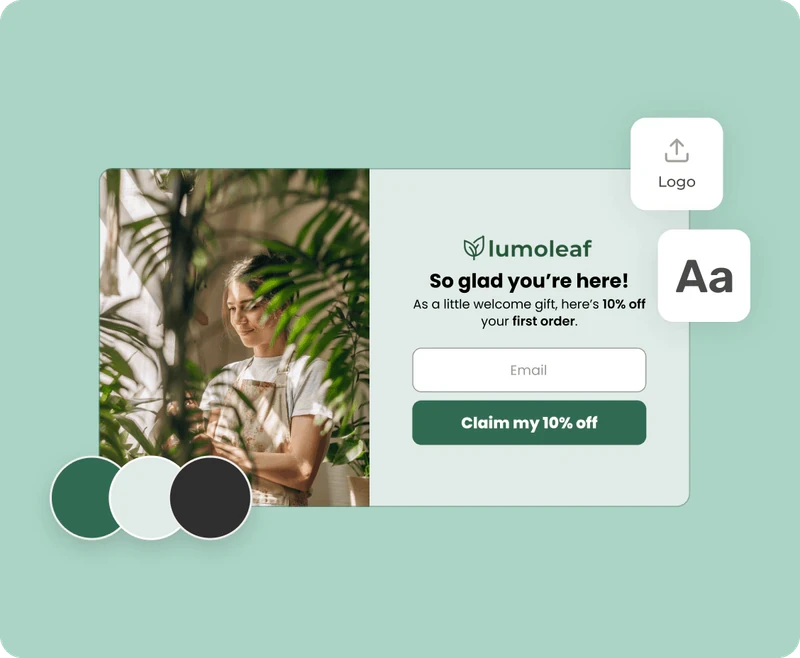
A discount coupon popup is a window that matches your brand’s style to highlight a special deal. It highlights the deal with a bold promo code, a strong headline, and visuals to prompt immediate decisions.
For the best results, invest some time into the discount coupon popup design so it doesn’t look like an intrusive ad. Here are some of the most important visual elements:
Clear incentive: The discount code is the main focus, clearly stating the reward (e.g., “Get 15% off”).
Brand consistency: It uses your specific fonts, colors, and tone to make the discount coupon popup feel native to your site.
Urgency triggers: Elements like countdown timers or “limited time” badges create a psychological push to act now.
Rich media: Product photos or floating illustrations help the discount widget “pop” and show visitors what they are shopping for.
Layout variety: Discount coupon popup designs range from subtle floating banners (for a gentle nudge) to center-screen lightboxes that darken the background for maximum focus.
Setting up a discount popup is simple with a builder like Claspo. You start by choosing a pre-made discount popup template, customizing the design to match your brand, and setting triggers like “exit-intent” or “time on page.” Once ready, you can embed the discount widget via a simple script or connect directly to platforms like Shopify.
Here is the typical workflow:
Pick a template: Save time by selecting a professionally designed layout.
Customize: Use a drag-and-drop editor to change colors, add images, and configure the promo code (e.g., adding a “click to copy” button).
Set display rules: Define who sees the popup (e.g., “New Visitors”) and when (e.g., “After 20 seconds”).
Go live: Publish the discount widget instantly without needing a developer.
As a top-tier platform, Claspo combines intuitive design with advanced features to enhance your coupon widget strategy and improve your conversion rate. With Claspo, you don’t need a developer, designer, or complicated setup. Just choose a coupon popup template, customize it to match your brand, set smart triggers, and go live in minutes.
Claspo stands out because it prioritizes both your ease of use and your visitor's experience:
No code required: Access over 1,000 professionally designed templates and customize them to match your brand.
Huge gamification choice: For an added element of excitement, you can create a Spin-the-Wheel pop-up, Pick-a-Gift popup, Treasure Hunt, and many other popular games.
Smart targeting: Use deep data (cookies, session history) to show offers only when they matter — like rewarding a loyal customer with a discount on next purchase or converting a first-time browser with a discount widget.
UX protection: Features like “Silence intervals” automatically prevent visitors from being bombarded by too many messages.
Revenue optimization: Built-in A/B testing helps you stop guessing and start proving which coupon popups drive the most sales.
There are several types of discount popups designed for different visitor behaviors. Common examples include “Welcome popups” for first-time visitors, “Exit-Intent” discount coupon popups to prevent bouncing, and “Cart abandonment” coupon popups to recover lost sales. You can also use “VIP offers” for returning customers or seasonal promotions for holidays.
An effective discount popup must have trigger-based logic to appear at the right moment, such as upon scroll or exit. It should also be mobile-optimized, fully customizable to fit your brand, and capable of integrating with your email platform. Urgency elements like timers are also crucial for a discount coupon popup.
When building a discount coupon widget, there are a few features that make a big difference in performance:
Trigger-based logic — use scroll depth, exit-intent popups, time on page, or cart activity to show coupon widgets at the right moment.
Customizable templates — start with a professionally designed coupon popup template and adapt it to your branding.
Mobile responsiveness — ensure your discount popups look perfect and works well on all screen sizes.
Urgency elements — use visual timers, limited quantities, or “ending soon” badges.
Seamless integration — plug your coupon widget into your website using direct integrations or a simple code snippet.
Analytics-ready — track views, clicks, and CR to see how well your coupon widget performs.
The best popup builder tools will let you tweak every part of the coupon widget — from layout and copy to behavior rules and targeting — so your discount coupon popup always feels natural and timely.
Yes, Claspo offers seamless integrations with major platforms to automate your workflow. You can connect your discount popups directly to CMS platforms like Shopify and WordPress, or sync data from coupon widgets with email services like Mailchimp and Klaviyo.
Our software integrates with:
Shopify, WordPress, and other CMS platforms, so you can easily embed your discount coupon popups without coding.
Email marketing platforms (EMS) like Mailchimp, HubSpot, and Klaviyo automatically sync email addresses collected from your discount coupon popups.
Analytics and automation tools such as Google Analytics, Tag Manager, and Zapier for deeper insight and smarter actions.
And if you need to connect a different system, simply use a webhook.
To prevent annoyance, use “Silence intervals” in your discount popups to set a delay between popups so visitors aren't overwhelmed after closing one. Additionally, “Overlap protection” ensures that multiple widgets — like a newsletter signup and a discount popup — never appear on the screen at the same time.
Silence intervals: You can control how often your coupon widget appears by setting delays between displays. For example, if a visitor closes the discount coupon popup once, they won’t see it again for some time. This reduces the chance they’ll immediately dismiss every following popup. Many brands see a direct increase in conversion simply by giving visitors this breathing space.
Overlap protection: One of the most common mistakes in Ecommerce is accidentally stacking multiple offers. Imagine a welcome popup, a newsletter opt-in, and a discount coupon popup all appearing at once — confusing at best, annoying at worst. Claspo automatically prevents this, ensuring you don’t overwhelm visitors with too many messages competing for attention.
A discount coupon popup with an effective design balances visual effect with user experience. Your discount popup should use your brand’s fonts and colors to look native. At the same time, the popup should remain bright enough to capture attention. Crucially, the design of a discount popup must be mobile-responsive. So make sure buttons are thumb-friendly, and text is legible on any device.
To maximize the effectiveness of your discount coupon popup, focus on these four aspects:
Match your visual identity: Don't settle for a generic template. Use the Claspo editor to adapt the discount popup layout to your store’s specifics. Vary text fonts, add product images to demonstrate to shoppers what they are missing, or use a lightbox effect to darken the background and draw attention to the coupon widget.
Personalize the experience: Generic discount popups are easy to ignore. Use dynamic merge tags to address visitors by name (e.g., “Hey John”) or assign unique discount codes to specific segments. For example, offer a "Welcome" code to new visitors and a “VIP” code to returning loyal customers. A personal approach is always appreciated.
Prioritize mobile users: Since most traffic comes from mobile, your discount popup design must adapt automatically. Ensure it’s easy to tap close buttons and that the promo code is large enough to copy without frustration.
Test and optimize: Use A/B testing to experiment with different incentives. Ever wondered what would convert better: “Save $25” or “15% Off”? Do you think adding a countdown timer to a discount widget would drive more clicks? With continuous testing, you can track how your discount popups evolve from “good looking” to “high converting.”
No, Claspo discount widgets don’t slow your website down. Our coupon widgets load asynchronously, which, in simple words, means that they do not block or slow down your main website content. Claspo scripts consistently score a perfect 100 on Google PageSpeed Insights
Yes, Claspo is fully compliant with major international data privacy regulations, including GDPR (General Data Protection Regulation) and CCPA (California Consumer Privacy Act). We prioritize the security of your data; that’s why we use industry-standard TLS encryption and strict access controls.